
First View
First Student Inc.Travel & Local
4.6316.00 Reviews
- Version
- 8.1.0
- Installs
- 100.00K
- Age Rating
- Everyone
Screenshots

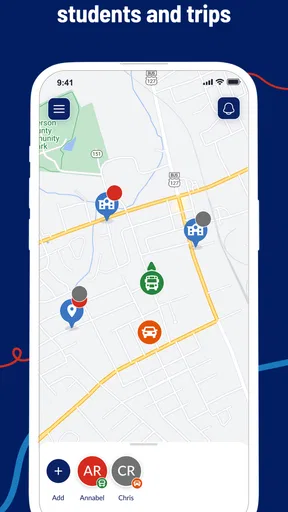
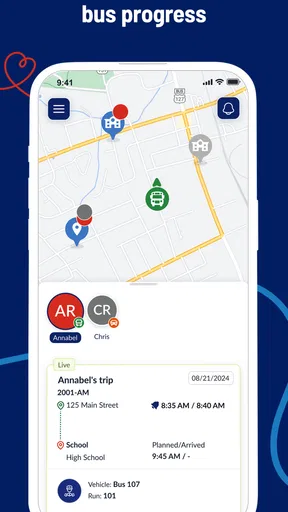
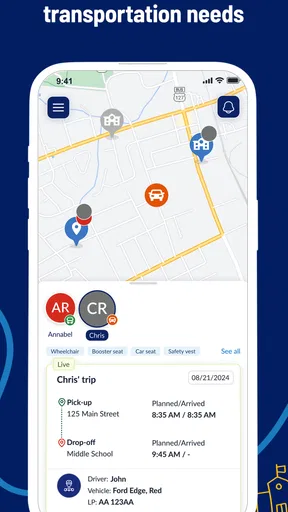
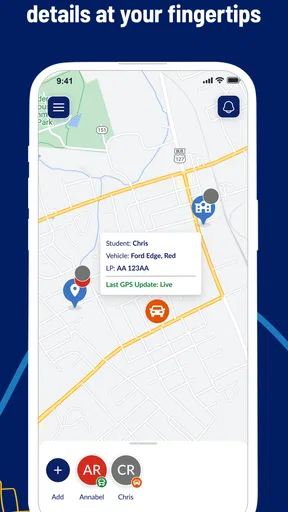
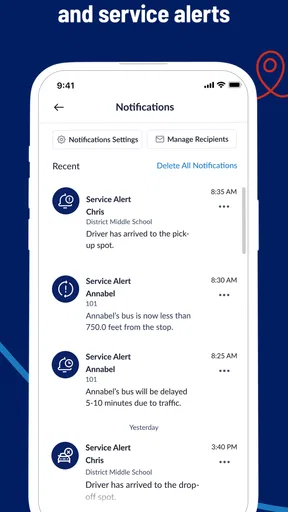
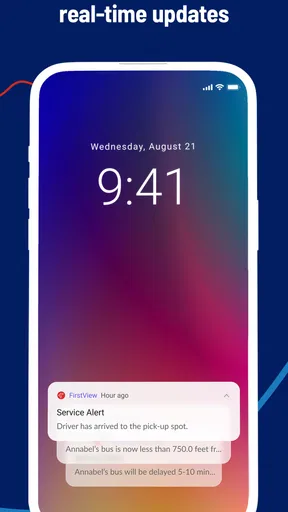
Our Review of First View
 Analysis by Appyee
When a child’s school transportation is part of a busy household routine, the hardest moments are often the small ones: waiting at the wrong time, wondering whether the bus has already left, or trying to coordinate pickup while work and errands are underway. First View is designed for that narrow but important problem. Developed by First Student Inc., this free Travel & Local app lets me follow a student’s journeys from a phone instead of relying entirely on guesswork or repeated messages.
After spending time with it, I see First View as a practical companion rather than a complete family-management tool. Its value depends on whether the student’s transportation service is supported and whether the household can use the same account information consistently. When those pieces line up, it can make school mornings and afternoons calmer. When they do not, the app cannot replace direct communication with the school, transportation provider, or the person responsible for pickup.
How First View fits into a shared household routine
The most convincing use case is a household where more than one adult needs awareness of a student’s bus journey. Imagine a parent working from home while a grandparent handles the afternoon pickup. Instead of both people trying to estimate the arrival time from the school schedule, the person responsible for pickup can check the journey status and prepare accordingly. The parent may still be working, but they have a better way to coordinate the handoff.
I also found the app’s focus helpful because it avoids trying to become a general-purpose family dashboard. First View is about student transportation. That means I would not use it to organize homework, appointments, messages, or broader household tasks. Its strength is the single question it addresses: where does the student’s journey stand right now?
For a family with changing schedules, that focused role can be useful. A caregiver may be delayed, a sibling may need attention, or the usual pickup person may change from one day to the next. Checking the journey before leaving can reduce unnecessary waiting. It is not a dramatic feature, but it is exactly the kind of small convenience that matters when school transportation happens twice a day.
There is also a shared-device angle worth considering. A tablet or phone used by several adults can be convenient, but it creates a responsibility to keep the account session and notifications under control. I would avoid leaving the app open on a device that children freely use, especially if the screen reveals journey information that should remain limited to trusted caregivers. The app supports coordination, but households still need sensible boundaries around who can view it.
What the app is good at during real-life disruptions
Scheduled times are useful when everything goes normally. They become less useful when a morning runs late or an afternoon pickup changes unexpectedly. First View is more valuable in those moments because it gives the caregiver a current reference point rather than forcing them to rely only on a printed timetable or a message sent earlier in the day.
For example, if I am preparing to leave for a pickup and the student has not yet arrived at the expected point, I can check the journey before making another phone call. That does not eliminate uncertainty, but it helps me decide whether to wait a little longer, contact another adult, or investigate a problem through the appropriate school or transportation channel.
A less obvious benefit is reducing duplicate coordination. In many households, one person checks the schedule, another sends a message, and a third person leaves early “just in case.” A shared view of the journey can give everyone the same starting point. It does not replace a family conversation, but it can make that conversation shorter and more precise.
I would still treat the app as an aid, not a guarantee. A journey display should not be the only reason a caregiver decides a child is safe to leave a location or walk somewhere alone. Younger students may need an adult present regardless of what the app shows, and unexpected road conditions or local changes can make any digital status less useful than direct confirmation.
Setting it up without blurring account boundaries
The first important setup question is not technical; it is organizational. The household should decide which adult owns the main account details and which people genuinely need access. If several relatives use the same login casually, it becomes harder to know who is viewing information and easier for credentials to spread beyond the intended circle.
I recommend choosing one responsible adult to complete the initial setup, then agreeing on how other caregivers will access the service. That approach is especially sensible when a child moves between two homes or has different people handling morning and afternoon transportation. The aim is not to create a complicated system, but to avoid a situation where everyone assumes somebody else has configured the correct student or journey.
Because First View is tied to student transportation, entering the right details matters more than rushing through the process. I would double-check the student selection and journey information before depending on the app for a time-sensitive pickup. A small setup mistake can look like a transportation problem later, when the real issue is that the wrong student or route context was chosen.
Shared-device households should also think about practical privacy. If an adult uses a family tablet, I would check who can open the device, whether the screen is visible in a common room, and whether the app remains signed in after use. These are not special controls I would assume the app provides; they are ordinary household habits that help keep transportation information within the right group.
What to do when access becomes confusing
Families often have more than one adult involved, and not everyone has the same technical confidence. I would keep a simple written agreement about who manages the account, who handles changes, and who should be contacted when the journey information seems wrong. This prevents a grandparent, babysitter, or second parent from making repeated guesses or creating separate arrangements that conflict.
If the app does not appear to match the child’s transportation situation, I would not keep changing random settings. First, I would confirm the student and journey details being used. Then I would contact the relevant school or transportation support channel if the underlying information appears incorrect. First View can display transportation information, but it is not a substitute for the organization that assigns or operates the service.
This is also where expectations matter. I would not install the app and assume every member of a household automatically receives the same view or that every school transportation arrangement works identically. The practical experience depends on the service relationship behind the app. Families should establish access calmly before the first urgent pickup rather than discovering account boundaries during a delay.
Using it to coordinate adults, not to monitor children constantly
First View works best when adults use it to coordinate responsibilities. One person can check the journey, another can prepare to meet the student, and both can communicate if plans change. That is different from watching the app continuously or treating it as a replacement for trust and conversation.
In my view, the household should agree on a few simple habits. The adult doing pickup checks the journey before leaving. If the status does not match expectations, that person tells the other caregiver what they see. If the situation remains unclear, they contact the school or transportation provider instead of repeatedly refreshing and assuming the display explains everything.
That workflow has a useful trade-off: it reduces unnecessary calls, but it requires everyone to understand that the app is a shared reference rather than an authority over every decision. A caregiver who is already with the student may know something the app cannot show. Likewise, a driver or school staff member may have information that has not yet appeared in the app. Good coordination combines the digital view with human confirmation.
I would also avoid turning the app into a source of pressure for older students. A teenager may appreciate that a parent can plan a pickup more accurately, but constant checking can feel intrusive. The most respectful arrangement is to explain why the app is being used, who can see the information, and when adults will check it. First View can support independence when it helps adults arrive at the right time without demanding constant updates from the student.
A practical afternoon routine
Here is the routine I would recommend for a household with alternating caregivers. The adult scheduled for pickup checks First View before leaving work or home. If the journey looks normal, they leave with enough time to reach the meeting point. If it appears delayed or different from the expected pattern, they notify the second caregiver before changing plans. The second adult does not need to repeat the entire search; they only need to confirm the plan and remain available.
The useful insight is that the app is most effective before the final rush. Checking too early may not answer the immediate question, while checking only after the expected arrival time may leave too little time to react. Each household will find its own timing, but the general principle is to use the journey view as a planning checkpoint, not as a live conversation that must be watched every minute.
This approach is particularly helpful when the pickup person is not the child’s usual caregiver. A grandparent or trusted sitter may not know the school’s transportation routine well enough to interpret every delay. A shared plan, plus the app as a reference, gives that person more confidence without asking them to make transportation decisions alone.
Age, trust, and the limits of digital reassurance
First View is rated for Everyone, which makes sense for an app centered on school transportation rather than mature entertainment or sensitive media. Still, an Everyone rating does not decide how a household should use it. The adult responsible for the student should determine who has access and how much independence is appropriate for that child’s age and circumstances.
For a younger student, the app is mainly an adult coordination tool. I would not treat a journey update as permission for a child to travel independently or wait in an unfamiliar place. Younger children may also misunderstand what a status means, especially if their real-world surroundings do not match what the screen suggests.
For an older student, the app can support a more flexible routine. A parent may be able to avoid unnecessary calls while still knowing when to prepare for pickup. Even then, trust works better when the student understands the arrangement. I would explain that the goal is planning and safety, not silently tracking every movement.
There is a broader privacy lesson here. Transportation information can reveal a child’s routine, so access should be limited to people who need it. I would be cautious about sharing screenshots in group chats or leaving the app visible on a public-facing screen. First View may make coordination easier, but it also makes responsible information handling more important.
The app is not the right choice for a household looking for a full parental-control suite, a messaging platform, or a comprehensive location-sharing system. Those tools address different needs. First View is better when the specific concern is a student’s school transportation journey and the household wants a focused way to plan around it.
Where the usual alternatives still have an advantage
The traditional alternative is a printed schedule, a school message, or a phone call. Those options remain valuable because they can explain context. A schedule tells me the expected routine, while a school or transportation contact may explain a disruption. First View is more convenient for checking the journey, but it should sit alongside those sources rather than replace them.
General location-sharing apps can be more flexible for families who need to coordinate many kinds of travel. They may cover walking, driving, activities, and errands in one place. However, that broader coverage can be unnecessary if the only recurring issue is the school bus. First View’s narrower purpose may be easier for a caregiver who does not want a complicated map full of unrelated locations.
Messaging apps are also useful for confirming who will pick up a student, but they depend on someone noticing and sending the message. First View can reduce that manual step by giving caregivers a journey reference before they ask for an update. The trade-off is that a message can include explanation and reassurance, while a journey view may only help with timing.
My preference would be to combine them selectively: use First View for transportation awareness, a normal message for changes in responsibility, and direct contact when safety or accuracy is in doubt. That division keeps each tool doing the job it handles best.
Performance expectations and everyday usability
First View is currently at version 8.1.0 and requires Android 10 or later. That requirement is reasonable for many current phones, but it matters in households where an older spare device is used for school routines. Before making the app central to pickup coordination, I would check that the intended phone or tablet can run it comfortably.
The app is free, which lowers the barrier for families who want to try it without adding another subscription to the household budget. It has reached over one hundred thousand installs, and its average rating is 4.6 from around four thousand eight hundred ratings. Those figures suggest that many users find the concept useful, though they should not be treated as a promise that every transportation setup will feel identical.
The developer, First Student Inc., is closely associated with the transportation context the app serves, which gives First View a more specific role than a generic tracking utility. That specificity is a strength when the service matches the family’s needs. It is also the reason I would not recommend installing it simply because another location app feels inconvenient; the fit with the student’s transportation arrangement is the deciding factor.
One practical tip is to test the household routine on an ordinary day before relying on it during a disruption. Have the usual pickup adult check the journey, explain what they see to the backup caregiver, and confirm who makes the final decision. This rehearsal reveals account confusion, device limitations, or unclear responsibilities while the stakes are low.
Another useful habit is to keep the app in its proper place in the morning checklist. It should not become the first thing a caregiver blames when a student is late, nor should it be ignored until the expected arrival has already passed. Treating it as one checkpoint among the school schedule, the child’s direct communication, and the adult pickup plan produces a more dependable routine.
My household verdict
I would recommend First View to families who use the supported student transportation service and want a focused way to coordinate pickups. It is especially suitable when different adults share responsibility, when work schedules make waiting difficult, or when a caregiver wants more current journey information than a fixed timetable can provide.
I would be more cautious about recommending it to someone seeking broad family tracking, child messaging, or detailed parental controls. Those needs call for different tools. I would also avoid depending on it without first confirming the correct student and journey information, establishing who manages access, and agreeing on what caregivers should do when the display and real life do not match.
What I like most is its practical scale. First View does not need to manage the entire household to be useful. It can simply help one adult decide when to leave and help another adult understand the plan. That small improvement can remove a surprising amount of daily friction, particularly when school transportation is shared across parents, grandparents, and sitters.
My final view is positive but measured: First View is best used as a coordination aid, not as a substitute for judgment, communication, or responsible adult supervision. If that boundary is clear, the free app from First Student Inc. can earn a regular place in a family’s school-day routine. For the right household, it turns an uncertain pickup window into a more manageable part of the day.
Verdict
Strengths of First View
- Quickly previews videos without opening the full post.
- Clean interface makes browsing visual content straightforward.
- Useful for checking content before committing to a full view.
- Supports fast scrolling through multiple posts.
- Helps reduce unwanted exposure to unsuitable content.
Limitations of First View
- Some previews may load slowly on weaker connections.
- Features can vary depending on the platform or app version.
- May use noticeable mobile data when browsing many videos.
- Preview quality may be lower than the original content.
- Limited value if you rarely browse video-based social feeds.
Similar Picks in This Category
View All
Google Maps
Google LLC3.4

Google Maps Go
Google LLC4.1

Booking.com: Hotels & Travel
Booking.com Hotels & Vacation Rentals4.8

Google Earth
Google LLC3.8

Skyscanner Flights Hotels Cars
Skyscanner Ltd4.8

trivago: Compare hotel prices
trivago N.V.4.4
Frequently Asked Questions
What is First View, and what can I use it for?
First View is designed to help users preview and organize visual content before deciding what to open, save, or share. Its usefulness depends on the version available for your device and the features enabled by the developer. After installing it, review the welcome screens and permissions carefully so you understand whether it is intended for browsing, discovery, customization, or another specific purpose.
Is First View free to download and use?
First View may be available as a free download, but the overall experience can vary depending on the platform and app version. Some features may require in-app purchases, a subscription, or may be limited in the free edition. Before confirming any payment, check the store listing for pricing, trial conditions, renewal details, and whether optional purchases are necessary for the functions you want.
What permissions does First View require?
The permissions requested by First View depend on how it operates on your Android or iOS device. It may ask for access related to notifications, photos, media, storage, or other system functions. During installation and first launch, read each request instead of approving everything automatically. If a permission seems unrelated to the app’s main purpose, you can deny it and check whether the application still works properly.
Does First View work offline or require an internet connection?
Some parts of First View may work without an internet connection once the application and its local content are loaded, while online features generally require Wi-Fi or mobile data. Internet access may be needed for downloading updates, synchronizing information, displaying remote content, or using account-based services. If offline access is important to you, test the app in airplane mode after installation.
Is First View safe and suitable for my device?
Before downloading First View, use the official Google Play Store or Apple App Store and verify the developer name, ratings, recent reviews, update history, and privacy information. Keep your operating system updated and avoid modified copies from unofficial websites. Also check the app’s age rating, data-collection disclosures, storage requirements, and compatibility details to make sure it suits your device and personal privacy preferences.
